
After MAP Packaging:
Weigh-Price Labelling Solutions
After modified-atmosphere packaging (MAP), variable-weight packs require net content, price, date, batch, barcode and traceability information to match the current product. This solution links product identity, actual weight, label templates, print data and label application into a continuous workflow.
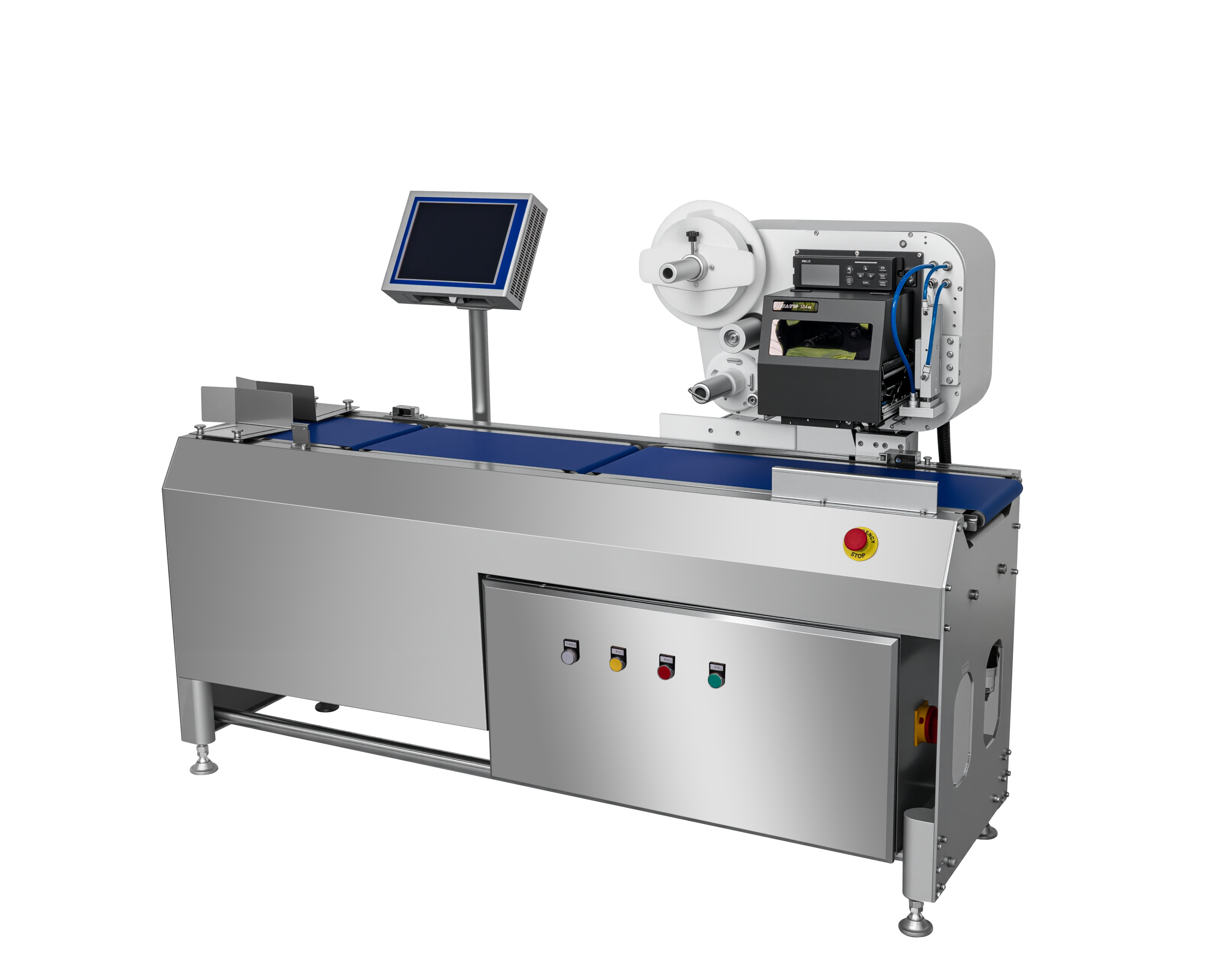
When is weigh-price labelling suitable after MAP packaging?
First establish whether label content depends on each pack’s actual weight, then choose between print-and-apply and weigh-price labelling.
When weigh-price labelling is suitable
- Pack weights vary and the label must show net content or weight.
- Weight is needed for price calculation, traceability or production records.
- Each product must receive its corresponding label without manual template-selection errors.
- Weighing, printing and application should run continuously after MAP packaging.
- Downstream scanning, vision inspection or MES/ERP integration is also required.
When a weighing module may be unnecessary
- Products have a fixed weight and label content does not depend on actual weight.
- Only production dates, batches, barcodes or order information need to be printed.
- Product identity is reliably provided upstream and the label template is fixed.
- The task consists of variable-data printing and automatic label application.
- Evaluate an inline print-and-apply labeller first to avoid adding an unnecessary weighing stage.
From MAP discharge to the correct label on each pack
A single SKU can proceed directly to weigh-price labelling. For continuous mixed-SKU production where upstream equipment cannot reliably bind product identity to each pack, add AI recognition before weighing to identify the SKU and select its template automatically. Vision inspection, scan confirmation and data interfaces can be added after labelling.
Discharge and product spacing
MAP trays enter the downstream conveyor steadily, with spacing suitable for weighing and labelling.
Confirm product identity
For a single SKU, identity can come from the production order. For mixed-SKU production, AI identifies the product and selects the corresponding label template before dynamic weighing.
Dynamic weighing
Capture the pack’s actual weight during continuous conveying and associate it with the current product.
Real-time label generation
Generate the current label data from weight, product, date, batch, barcode and traceability rules.
Printing and automatic application
An industrial print engine prints each label in real time. Top, bottom or other application methods are configured for the project.
Inspection and data recording
Optional vision inspection, barcode confirmation, exception handling and production-data feedback complete the downstream quality-control process.
How does a mixed-SKU line identify products before weighing and labelling?
When different MAP-packaged SKUs arrive continuously, the system first confirms the current product’s identity, retrieves the associated product data and label template, then performs dynamic weighing, real-time printing and automatic application. The operating video below illustrates this continuous sequence.
The video shows how product recognition connects to downstream weighing, printing and label application during mixed-SKU production. Recognition targets, SKU count, templates, pack dimensions, target rate and exception logic must be confirmed using samples and actual site conditions.
Identify the current MAP product before weighing and labelling
When MAP-packaged SKUs share a continuous line, product identity must be established before weighing. AI recognition determines which label template to retrieve, linking identification, weight, template, printing and application.
AI product recognition
Identify the product category or SKU of the current MAP tray.
Retrieve product recipe
Automatically match product data and the label template to the recognition result.
Dynamic weighing
Capture the current pack’s actual weight and bind it to the SKU.
Print and apply
Insert weight, batch, date, barcode and other variable data into the correct template.
Post-labelling inspection
Optional vision inspection checks label content, position, barcodes and missing labels.
Six inputs for a faster, more accurate proposal
Equipment selection requires more than a target speed or weighing range. Actual products and site conditions determine the final configuration.
Pack dimensions and condition
Provide length, width, height, tray format, film condition and whether packs may slip, shift or carry moisture.
Minimum and maximum weights
Describe the actual production weight range and whether net content, price or tare calculations are required.
Target throughput and spacing
Provide packs/min or trays/hour, together with product length and the actual upstream discharge rate.
Label dimensions and print content
Provide sample labels and identify variable fields such as weight, price, batch, date, barcodes and QR codes.
Application position and method
Confirm top, bottom, side or combined top-and-bottom labelling and whether surfaces are flat, wet or subject to condensation.
Source of product information
Specify single-SKU or mixed-SKU production. For mixed production, define how AI identifies products, how results map to SKUs and templates, and whether MES/ERP/WMS also supplies production orders.
Stable operation depends on more than maximum specifications
Keep product, weight and label matched
As MAP trays move continuously, the system must track the current product, its weight and the label it needs. Unclear spacing, job-changeover or exception-handling rules can lead to mismatched products and labels.
Line rate depends on more than printer speed
Actual throughput depends on pack dimensions, conveyor spacing, weight settling time, print content, label size, application motion and scanning or vision operations. Confirm continuous performance using actual products.
Condensation, moisture and pack surfaces affect adhesion
MAP foods often encounter cold, humid or condensing conditions. Label stock, adhesive, application position and pressing method must be assessed against the packaging surface; label dimensions alone are insufficient for selection.
Assess upstream and downstream equipment together
Confirm MAP-machine discharge height, direction, rate and spacing, as well as connections to metal detectors, vision systems, case packing and conveyors. A standalone machine meeting its specifications does not establish stable performance for the whole line.
Select functions to match the project
Factories have different requirements after MAP packaging. Start with the necessary functions and provide interfaces for future expansion.
Weigh, print and apply after packaging
For lines with known product identity and stable templates, but variable pack weights requiring real-time weight labels.
- Product spacing
- Dynamic weighing
- Label generation
- Real-time printing and automatic application
AI identifies the product, selects its template and coordinates weighing
For continuously discharged mixed SKUs after MAP packaging, AI identifies the current product and confirms its SKU. The system selects the corresponding template, then dynamically weighs, prints and applies the label.
- AI recognition of the current product / SKU
- Automatic selection of the corresponding label template
- Dynamic weighing and insertion of actual weight
- Real-time printing and automatic application
- Alarm, rejection or confirmation after recognition failure
Add inspection and data integration after labelling
For projects with greater requirements for label correctness, code verification, traceability and production records, vision and data systems can be added.
- Post-labelling vision inspection
- Barcode / QR-code confirmation
- Exception handling
- MES / ERP / WMS interface
- Production-data retention
Confirm specifications together with product conditions
The following are project requirements to agree during technical discussions, rather than fixed equipment specifications.
| Item | Confirm | Why it matters |
|---|---|---|
| Weighing range | Minimum and maximum weights, tare rules and label weight fields | Determines the weighing module and data-processing method. |
| Dynamic weighing performance | Product dimensions, speed, spacing, conveyor stability and site vibration | Dynamic error cannot be assessed from static load-cell specifications alone. |
| Printing configuration | Label width, print area, content density, resolution and printing method | Determines print-engine configuration and actual printing time. |
| Application mechanism | Top, bottom, side or combined application and packaging-surface conditions | Different positions and surfaces require different application motions. |
| Production rate | Actual packs/min, product length, spacing and upstream discharge method | Line throughput is limited by the slowest or least stable operation, rather than a single machine’s maximum rating. |
| Product recognition | Single-SKU identity from the production order; AI product/SKU recognition for mixed production | Recognition determines the label template and helps prevent product/label mismatches on mixed lines. |
| Data interfaces | MES/ERP/WMS、databases, fields, protocols and exception handling | Defines the flow of production orders, weights, labels and traceability data. |
| Acceptance testing | Representative samples, continuous-run duration, exception tests and FAT/SAT | Turns proposed capability into agreed, executable and verifiable acceptance criteria. |
Explore equipment, selection guidance and actual projects
Weigh-price labelling after MAP packaging: common questions
Why use weigh-price labelling after MAP packaging?
When pack weights vary and net content, price, batch or traceability information must match each product, dynamic weighing after MAP packaging captures the actual weight and generates the corresponding label in real time.
Do fixed-weight products need weigh-price labelling?
Not always. If label content does not depend on actual weight and only dates, batches, barcodes or order information are required, evaluate an inline print-and-apply labeller first to avoid unnecessary weighing.
Why use AI recognition for mixed-SKU MAP trays?
When different MAP-packaged SKUs arrive continuously, the system must identify the current product to select the correct template. AI identifies the product/SKU and drives template selection, dynamic weighing, printing and application. Recognition failure must trigger an alarm, rejection or operator confirmation according to project rules; labelling should not continue without confirmed identity.
How should weigh-price labelling speed be confirmed?
Assess product dimensions, spacing, weight settling time, label size, print content, application motion and additional vision or scanning operations together; the maximum speed of a print engine or standalone machine is insufficient.
Can labels after MAP packaging connect to MES or ERP?
According to the agreed data architecture, fields, protocols and responsibilities, production orders, SKUs, weights, templates, batches, print results and traceability data can connect to MES, ERP, WMS or databases.
When should sample testing come first?
For wide weight or size ranges, moisture or reflections on packs, high target rates or unusual label positions, or when AI recognition, vision inspection or system interfaces are required, start with representative actual-product tests.
Start with actual product conditions after MAP packaging
Provide product photos or videos, dimensions, weight range, label samples, target rate, label positions and data-interface requirements to assess basic weigh-price labelling, automatic multi-SKU selection, or additional vision inspection and data integration.
 微信扫码咨询