
Robotic Labelling SystemComplex Application Positions · Flexible Changeovers · Vision Positioning · Data Integration
Where fixed applicators cannot reliably reach multiple positions, handle changing pack sizes or accommodate complex shapes, NCN integrates industrial robots, print engines, label applicator tooling, optional vision positioning, conveyor control and production data interfaces into one labelling system.
Submit Project Requirements Is Robotic Labelling Right for the Application?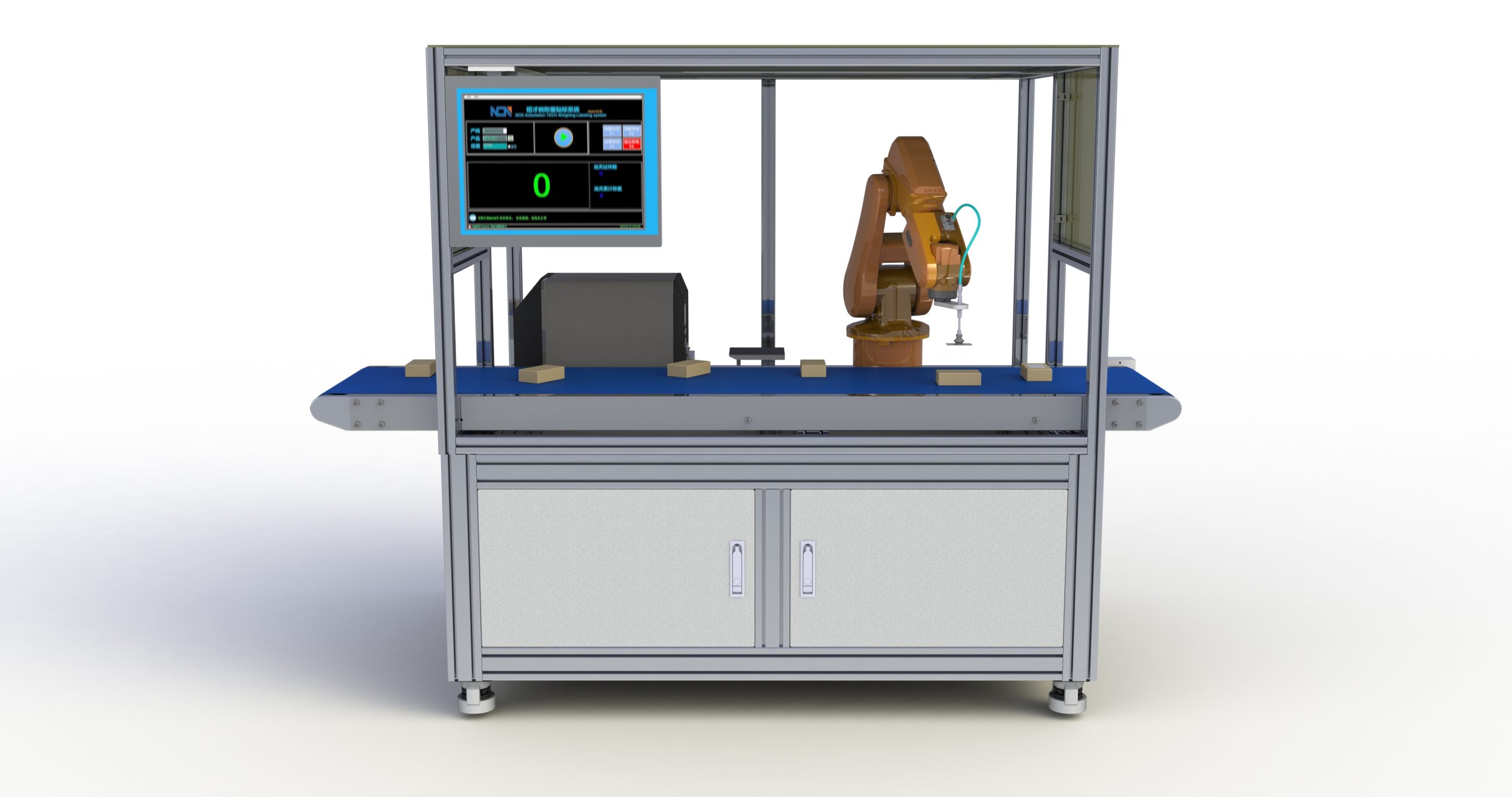
Robots Are Not a Replacement for Every Label Applicator
For products travelling in a fixed orientation with consistent label positions and limited dimensional variation, a conventional print-and-apply unit is often simpler and more economical.
When labels must be placed on several faces, application positions vary, pack dimensions differ considerably or paths need correction based on actual product position, a robot provides more freedom of movement and programmable changeover.
A typical system comprises an industrial robot, print engine, label pick-up/applicator tooling, PLC, safety controls and optional vision, with operating programs selected by the production task.
Discuss Project FeasibilityWhen Is Robotic Labelling the Better Choice?
The decision is not whether a robot looks more advanced. It is whether a conventional applicator can reliably meet the required position, throughput and changeover conditions over time.
Prefer a Conventional Applicator
Where the product path, label position and pack dimensions remain consistent, a fixed applicator is usually simpler.
- Fixed top, side or bottom positions
- Stable product orientation and position on the conveyor
- Limited SKU variation
- No practical need for multi-axis robotic movement
Consider Robotic Labelling
A robotic arrangement is more useful where label positions, product orientations, dimensions or assigned tasks vary significantly.
- Several application faces or positions on the same product
- Different SKUs require different label locations
- Vision-based product positioning and robot path correction are needed
- Cartons, pallets or larger products require an extended operating envelope
Four Core Capabilities of a Robotic Labelling System
Multi-Position Application
Multi-axis movement can reach the top, sides, front, back and other agreed application positions.
Programmed Changeovers
Use separate motion programs and label tasks for different products to reduce mechanical adjustments.
Vision Positioning
Cameras can be configured to locate products or identify features and correct the robot’s application path.
Printing & Data Integration
Label content can be linked to production orders, databases, MES or ERP for on-demand printing and application.
Typical Components of a Robotic Labelling System
The robot is only the motion device. Stable operation depends on coordinated printing, label pick-up, product location, movement, safety and data control.
Selected for reach, payload, line speed and available site space.
Generates and prints variable labels from production tasks.
Label pick-up and application tooling designed for label dimensions, pack surface and motion.
Optional product positioning, feature recognition or verification of applied labels.
Coordinates conveyors, interlocks, guarded access, safety light curtains and the robot work area.
Links production tasks, label templates, databases and MES/ERP systems.
Typical Operating Sequence
Product Infeed
Convey to the robot station
Product Identification
Confirm SKU or production task
Label Generation
Print variable-data label on demand
Label Pick-Up & Positioning
Robot picks up the label
Automatic Application
Follow the programmed path
Result Output
Completion signals and records
Typical Applications
Apply labels to two or more different faces of the same product.
Detect the actual product position by vision and correct the robot path.
Cartons, pallets and industrial products requiring greater reach and workspace.
Change the application position by SKU using programs instead of repeated mechanical adjustments.
The robot collects each printed label and applies it to the corresponding product at the specified position.
Combine with conveying, vision, inspection, scanning, weighing or production data systems.
The System Must Coordinate More Than Robot Movement
Printing, product positioning, robot motion, conveyor timing, safety controls and production data must agree for a reliable robotic labelling installation.
- Product Conveying & In-Position Detection
- Production Task or SKU Identification
- Industrial Print Engine & Label Templates
- Robot & Label Application Tooling
- Vision Positioning & Result Verification
- PLC, Safety Controls & Production Data Interfaces
Prepare These Six Details Before Planning a Robotic Labelling System
Robotic labelling is a customised automation project. More complete initial information helps establish whether the approach is appropriate.
Length, width, height, weight range and product surface characteristics.
Length, width, material, backing liner and print content.
Top, sides, front, back or multiple defined surfaces.
Products per minute, labels per product and spacing.
Conveyor direction, available space, robot workspace and safety clearances.
Whether MES, ERP, databases, scanners or vision systems need to communicate with the line.
Frequently Asked Questions
Is a Robotic Labeller Always Better Than a Conventional Applicator?
No. A fixed applicator is often preferable for consistent products and application positions. Robots are better suited to multiple positions, many formats, extended reach or vision-based positioning.
How Fast Can a Robotic Labelling System Run?
There is no universal speed figure. Throughput depends on robot travel path, label quantity and size, printing time, product spacing and positioning method. It must be calculated for the specific process.
Can One Robot Apply Labels in Several Positions?
Yes, where the working envelope, product orientation and target throughput permit. Robot paths, possible interference and total operation time per product must be assessed.
Can the System Connect to MES, ERP or Vision?
Yes. Interfaces can link production tasks, label templates, printed data, robot programs and execution records according to the project’s requirements.
Review the Product, Label Positions and Site Layout Before Choosing a Robot
Send product photographs, dimensions, label samples, required positions, target throughput and the production layout. These help us determine whether robotic labelling offers a practical advantage.
提交您的项目需求
告诉我们应用场景与节拍要求,我们会在 1 个工作日内提供选型建议与方案参考。
 微信扫码咨询