
Print & Apply LabellerReal-Time Variable-Data Printing · Automatic Label Application
Designed for product identification on production lines, this system generates label content from the current production task, prints it on demand and applies it to the required position. Typical applications include barcodes, dates, batch codes, product information and traceability labels.
Request an Equipment Proposal View Technical Specifications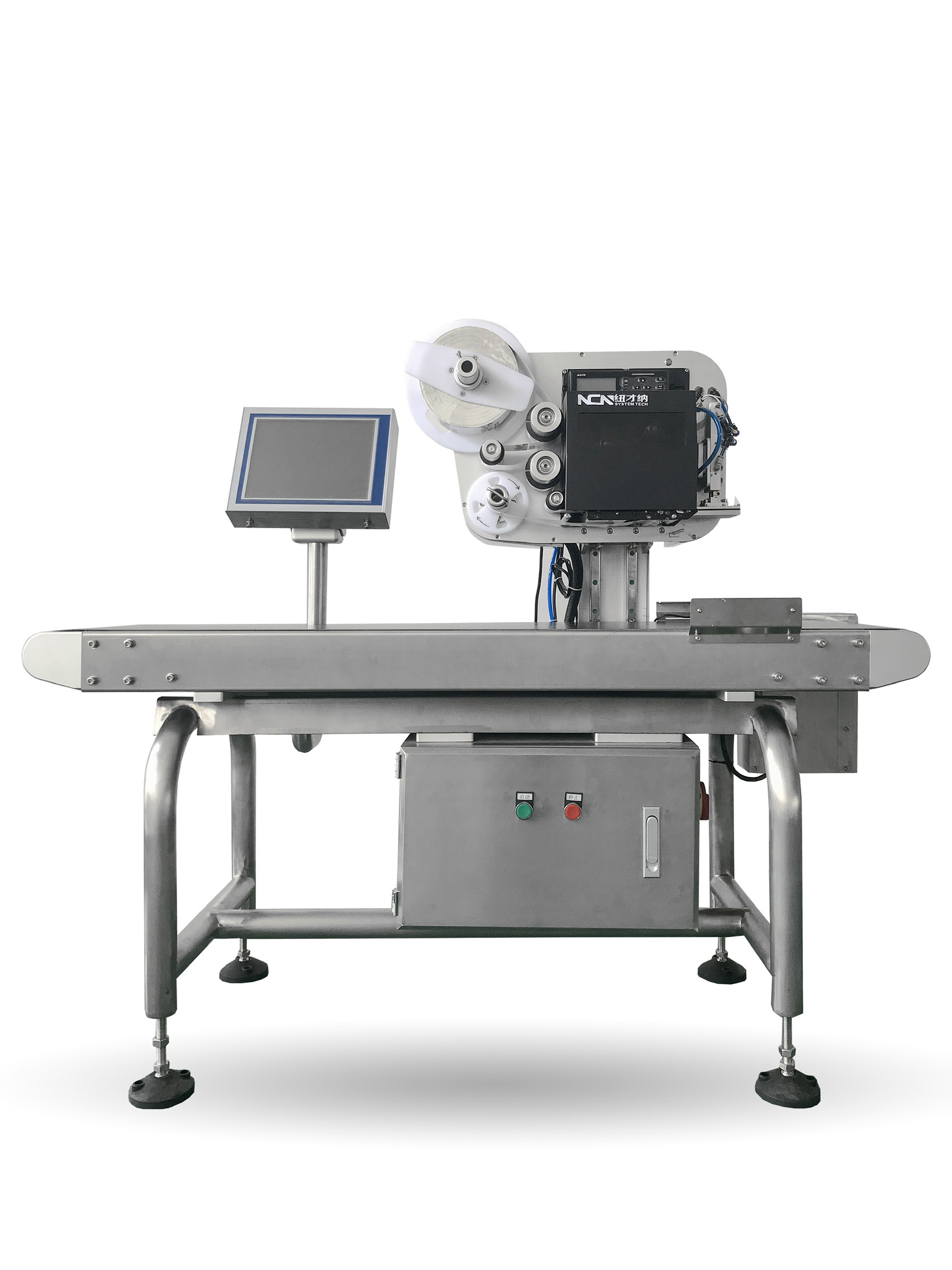
Printing and Application Within the Same Production Cycle
An inline print-and-apply labeller combines an industrial print engine, label dispensing and automatic application in a production line. When a product reaches the application position, the system prints the label for the current task and applies it to the pack.
Unlike using rolls of preprinted labels, printing on demand is useful when dates, batches, serial numbers, barcodes, QR codes or other production information change from product to product.
The system can run independently or connect to label management software, databases, MES, ERP or traceability systems.
Send Project RequirementsPrinting, Data Handling and Label Application in One Machine
Print-and-apply labelling is not just about printing a label. The product, production task and printed content must remain matched at the point of application.
Variable-Data Printing
Print barcodes, QR codes, dates, batches, serial numbers and product information from the active production task.
Automatic Labelling
Detect the product at the required position and trigger label application. The applicator is selected for the product and production conditions.
Product-to-Task Matching
Associate each product with the correct label task to reduce manual selection of templates and data.
Production System Connectivity
Connect to databases, MES, ERP, label management or traceability systems according to project requirements.
Typical Print & Apply Process
Products, production tasks, label data and applicator actions must be synchronised with line speed.
Product Infeed
Detect the approaching product and identify its assigned task.
Retrieve Data
Read product, order, date, batch or database information.
Real-Time Printing
Generate and print the label for the active task.
Automatic Application
Apply to the top, side or another specified position.
Product Outfeed
Transfer the labelled product to inspection, case packing or downstream conveyors.
Different Products Need Different Application Methods
Top Print & Apply
Suitable for cartons, trays, bags and packs with a stable upper application surface.
Side Print & Apply
Apply identifiers to the sides of cartons or other packs, with the mechanism designed around product height, position and conveying behaviour.
Multi-Position & Custom Applications
Pneumatic, servo-driven or robotic equipment can be integrated for different positions, varying pack sizes or special application requirements.
A Label Often Forms Part of the Production Data Chain
When label content comes from orders, batches, databases or MES, the print-and-apply machine is no longer an isolated mechanical unit; it performs an operation within the production-data workflow.
- Select different label templates according to the production task.
- Print variable text, barcodes, QR codes and other fields.
- Connect to databases, MES, ERP or label management software.
- Work with vision, weighing, inspection and downstream sorting equipment.
- Record production and label data when required by the project.
Typical Technical Configuration
The actual configuration depends on product dimensions, label format, application method, production rate and site interfaces.
| Printing Method | Direct Thermal / Thermal Transfer |
|---|---|
| Print Resolution | 200 dpi / 300 dpi, depending on the print engine. |
| Print Speed | Up to approximately 300 mm/s on applicable systems; actual speed depends on label size, content and printing method. |
| Label Content | Text, dates, batches, barcodes, QR codes, serial numbers and other variable data. |
| Communication Interfaces | LAN / USB / RS-232 and other options according to project configuration. |
| Application Method | Top, side and custom application positions as required. |
| Host Systems | Connections to databases, label management, MES, ERP and traceability systems as specified. |
| Machine Configuration | Adapted to food packs, cartons, bags, trays and industrial products based on site conditions. |
After Reviewing the Specifications, Check Whether the Configuration Fits Your Line
Review the equipment selection reference against label dimensions, print content, application position, target throughput, product size and required data interfaces.
Confirm These Five Areas Before Preparing a Proposal
Product
Photos, length/width/height, packaging type and conveying orientation.
Label
Size, sample, roll diameter, print content and application position.
Throughput
Target line speed, product spacing and continuous operating duration.
Data
Source of label content and any MES, ERP or database interface.
Production Site
Conveyor height, space, temperature, humidity and upstream/downstream interfaces.
Related Products & Technical Information
Start with the Product, Label and Site Conditions
Share product photos, a label sample, dimensions, target throughput and application position so we can recommend the appropriate print-and-apply arrangement.
提交您的项目需求
告诉我们应用场景与节拍要求,我们会在 1 个工作日内提供选型建议与方案参考。
 微信扫码咨询