
Dingdong Grocery — Weighing & Labelling System Integration Case Study
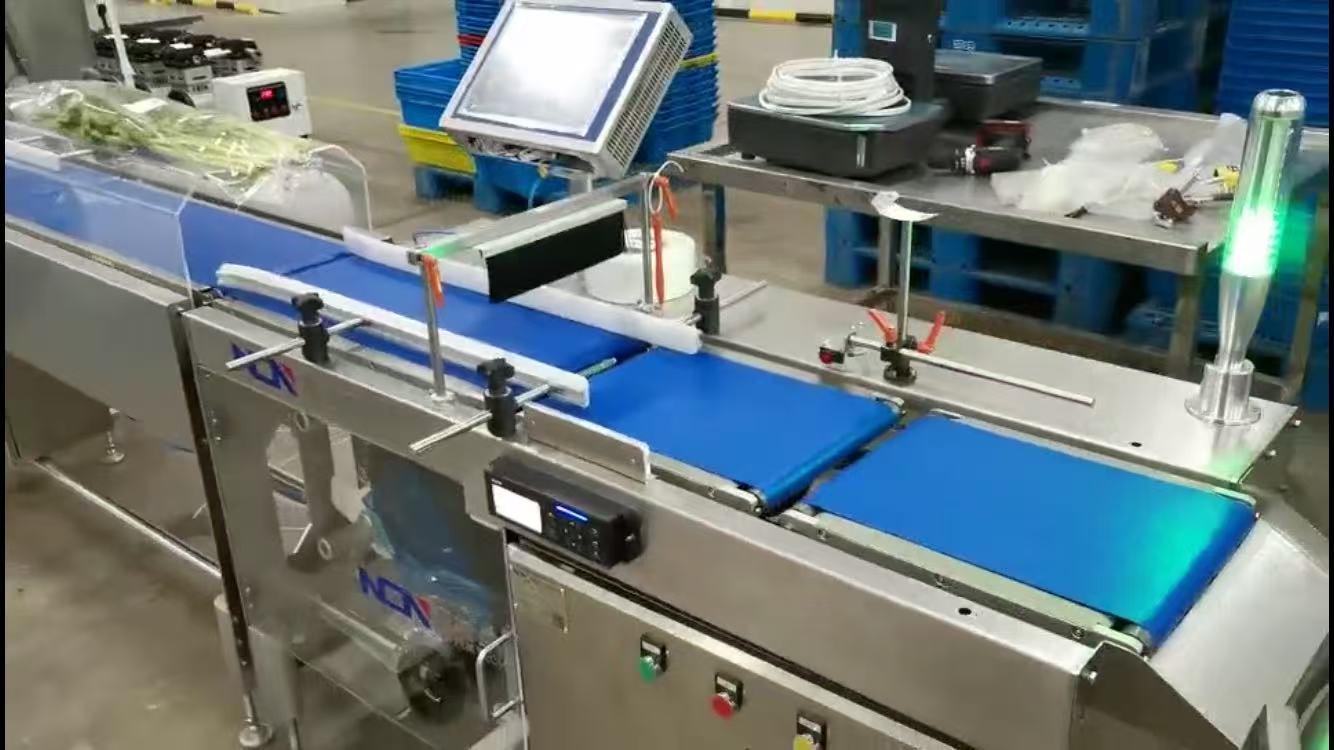
At food production facilities associated with Dingdong Grocery, NCN implemented more than an integrated weighing and labelling machine. The installed system connects production tasks, product records, label templates, measured weights, label printing and application, and execution data returned to the business system. The project has operated for several years, with software and labelling rules revised as business requirements changed.
Why Connect the Weighing & Labelling Equipment to Dingdong Grocery’s Business System?
A multi-SKU food factory manages not only packs of differing weight but also product codes, production tasks, work groups, label templates, QR-code rules and master data. Re-entering this information at the machine can create a second, inconsistent set of records.
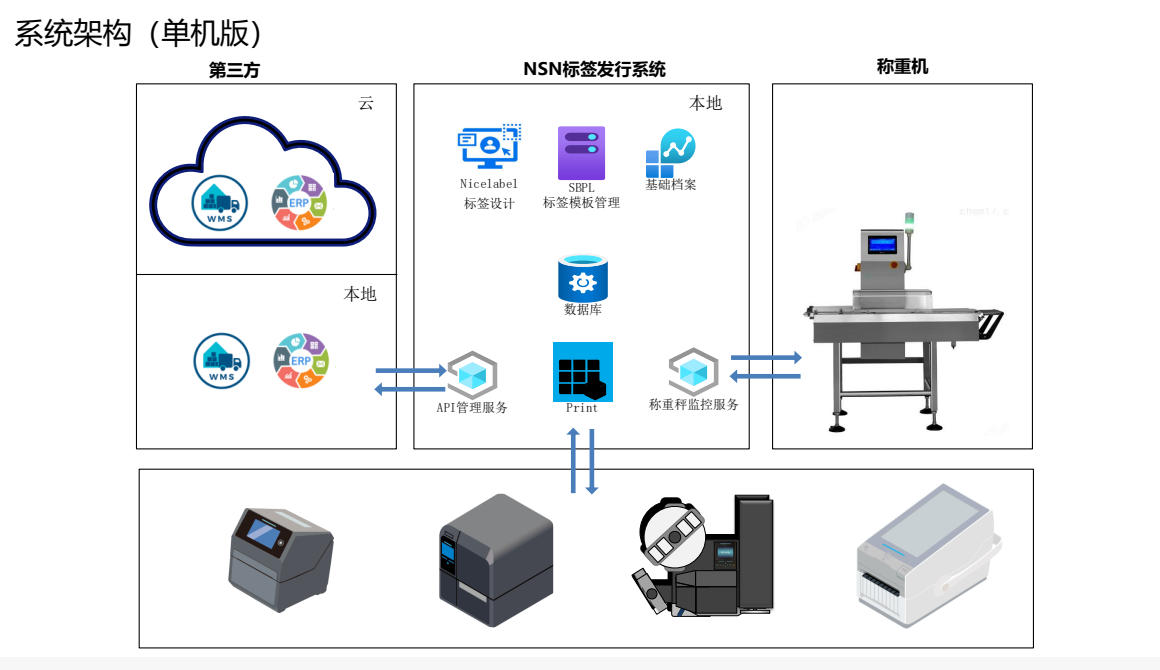
In this project, the weigh-price labeller acts as the execution station, while label management software, the database and API services provide the data layer. The operator enters a group identifier to retrieve the labelling tasks assigned to that station, selects the product, then runs weighing and labelling. Execution data is returned according to the defined interface.
Production tasks are defined in the host system
Products, materials, jobs and group information do not need to be recreated as separate business logic on the machine.
The weigh-price labeller performs the physical operations
After retrieving the job, the machine captures the weight, generates label data, prints and applies the label, then sends results back to the system.
How Do Production Tasks Become Returned Labelling Records?
Operators confirm the current job; product records, measured weights, labelling rules and result reporting form one connected process.
More Than a Stand-Alone Machine: Business System, Label Software, Database and Weighing Equipment
The customer’s third-party business system exchanges data with NCN’s local label management software through interface services. The label system handles label design and templates, master data, database records, printing services and weighing equipment monitoring, then communicates with the on-site weighing and printing devices.
This architecture separates business data from machine actions. The host system defines what to produce, the local software converts the job into weighing and labelling operations, and the equipment reports its execution results.
Why Is This Arrangement Suitable for Ongoing Operations?
Product records, label rules and interface logic can be maintained as business requirements change, without mechanically modifying the equipment for every change.
Labels Are Generated from Product Records and the Measured Weight — Not Stored as Fixed Images
Product master data can include product name and code, sales and packaging specifications, storage conditions, instructions for use, applicable product standards, shelf life, manufacturer, label template, nominal weight, upper and lower weight limits and weight units.
Print-command templates are maintained within the system, with NiceLabel used for label design. At printing time, the machine combines the current product, its master data and the actual measured weight to generate the final label.
- Link each product to the correct label template
- Maintain multiple label command templates
- Use the measured weight as a variable in label generation
- Configure nominal weight and upper/lower limits by product
- Capture weight data in grams and convert the displayed or printed units based on product settings
- Query and export printing history
A Measured Weight Is Not Automatically a Printable Weight
The system evaluates each reading against the limits configured for the current product. A reading outside those limits does not proceed through normal label printing; it is recorded in the exception or rejection history. Accepted readings are formatted using the product’s unit and display settings.
Upper & Lower Weight Limits
Readings outside product-specific limits are not printed as ordinary accepted-product labels.
Gram / Kilogram Conversion
The source data is in grams; label units and decimal places follow the product settings.
Exception & Print History
Printing and exception records support on-site lookup, reprinting and troubleshooting.
Business Requirements Continue Changing After Years of Operation
A long-running system must accommodate new product data, label formats and shop-floor practices, not merely function on its first day of commissioning.
Equipment and software used in daily production
Weighing, label generation, printing, application and production-task data exchange have become part of normal operations rather than a one-off trial.
Two-Line Product Name Fields
For long product names, the master record was extended with Name 1 and Name 2 fields, each referenced separately by the label template.
Tare Field & Net Weight Calculation
A tare field was added to product records; business-use weight is calculated as scale reading minus tare weight to meet updated site requirements.
What Does This Case Demonstrate?
Equipment-to-Business-System Integration
Production equipment follows jobs defined by the business system instead of maintaining a separate product database indefinitely.
Product, Weight & Label Matching
Actual measurements and product records are used together when generating labels.
Returning Execution Results
Applying the label is not the end of the process; results are sent back according to the interface specification.
Ongoing Software Maintenance
Product name layout, tare handling and label rules can be revised after the system enters production.
The Key Question for Integrating Weighing Equipment Is Not Simply Whether It Has an API
Define the Relationship Between Data and Physical Operations
Equipment IDs, work groups, product tasks, label templates, weight limits, barcode rules, printing status and returned results each need a clear data owner, trigger point and exception-handling rule. Without those definitions, an interface may work in a test but fail as part of continuous production.
Can the Weighing & Labelling Equipment Retrieve Tasks from MES, ERP or WMS?
Integration is possible where the customer’s system provides suitable interfaces. The interface specification, task fields, equipment identification, triggers and exception handling must be confirmed for the project.
Must a Product’s Label Template Be Redesigned for Every Job?
No. Products can be associated with label templates and the correct template selected for the current task. New rules may require software changes depending on the content and printing logic.
Can the Software Still Be Changed After Years of Production?
Yes, subject to the project architecture and operational requirements. Here, two-line product names and tare-weight handling were added after the system had been in use.
Related Equipment & System Capabilities
Need to Connect Weighing & Labelling to an Existing Business System?
Share production task fields, label samples, product master data and interface specifications. We can then assess how the machine and data systems should interact.
 微信扫码咨询