
Cooked-Food Warehouse Scanning: Connecting Barcodes, Weight Data and APIs
A cooked-food plant in Ningxia extended its automated weighing and labelling system with warehouse scanning software and an interface to its host system. The project connects the scanning operation to the wider data workflow, creating searchable links between product barcodes, names, item codes, aggregated weights and warehouse receipts.
Why add warehouse scanning after weighing and labelling?
Applying a product label does not complete the data workflow in a food factory. When weighing results, product barcodes and warehouse systems operate independently, staff may still need to re-enter or manually reconcile product and weight information.
This project extends the existing automated weighing and labelling process: after weighing and label printing, the label barcode is scanned to identify the product, and its master data and corresponding aggregated weight data are uploaded to the customer’s host system.
Weighing and labelling are already automated
The upstream line already performs dynamic weighing, label generation and automatic label application.
The next step: connect to the business system
Warehouse scanning links product barcodes and weights with product master records and warehouse receipts in the host system.
How does warehouse scanning work?
From product detection to the host system returning a warehouse receipt number, the workflow involves a PLC, barcode scanner, industrial PC, local database and API.
Which data does the system connect?
Scanning is the entry point. To interpret the scan correctly in the host system, the software first retrieves product master data from the customer’s system and then uploads production weights against the corresponding product.
- Retrieve product IDs, item codes and names through the API
- Save master data in the local database for scanning and data matching
- Identify the current product from its label barcode
- Aggregate the corresponding product weights on the industrial PC using the configured logic
- Upload parameters including product ID, item code and weight
- Receive a unique warehouse receipt number for the upload from the host system
What can operators see in the actual interface?
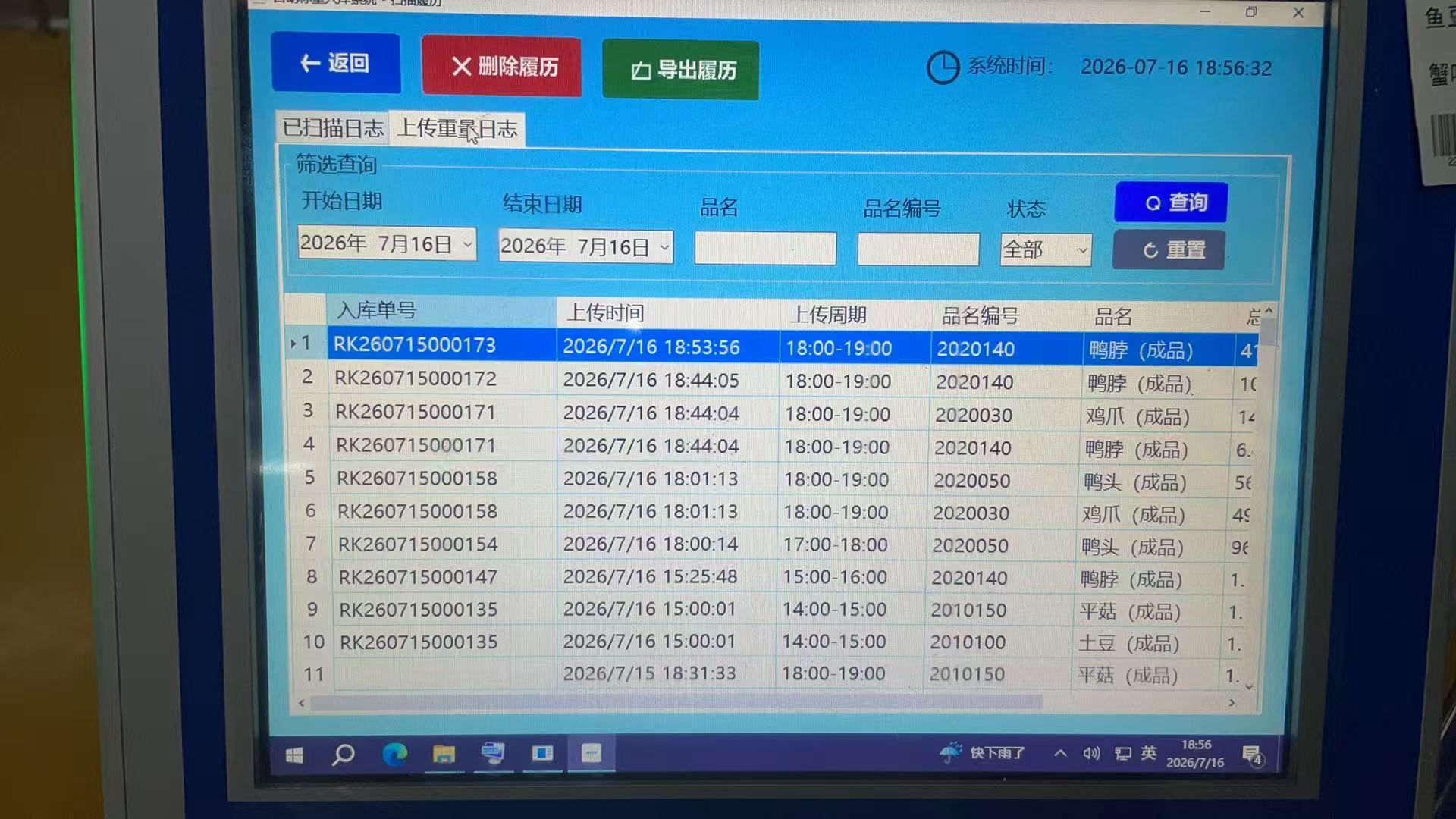
The site screenshot shows the weight-upload log in actual operation, rather than a demonstration screen.
Warehouse receipt number
Each data upload is linked to a warehouse receipt for subsequent lookup.
Upload time and reporting period
View the upload timestamp and the period covered by the aggregated data.
Product name and item code
Upload records display the product name and item code for on-site checking.
Search and export history
Filter by date, product and status, query historical records and export them.
Exception handling for industrial operation
Scan failures, interface errors and incorrect data matching can interrupt continuous production. The project therefore includes exception handling and history lookup alongside the normal workflow.
Scan errors
A scan error triggers a PLC alarm and an on-screen warning. Scanning resumes after operator confirmation.
Normal and exception history
Normal scans, failed scans and upload records can be retrieved to support troubleshooting.
CSV export
Historical data can be exported as CSV for analysis, reconciliation or archiving.
Value beyond a barcode scanning application
Link products with their weights
Each weighing result is associated with a specific product record.
Reduce duplicate data entry
On-site scanning and API uploads replace some manual re-entry and transfer of weight data.
Maintain searchable history
Scan, upload and warehouse receipt records support tracing and investigation of exceptions.
Bring equipment data into business workflows
Data generated by the weigh-price labeller continues into the customer’s warehouse system.
NCN’s role from weighing and labelling to warehouse scanning
The project brings together more than an individual machine or software screen: it connects automation equipment to the customer’s business system. Upstream weighing and labelling generate the weights and labels; downstream warehouse scanning identifies products, aggregates weights, calls the API and records upload results.
For food factories, the next stage of end-of-line automation often involves connecting existing equipment so that weighing, labelling, inspection and warehouse data continue along the same production workflow.
Related case studies and products
Need equipment data in your MES, ERP or warehouse system?
Share your barcode rules, product data, interface documentation and required upload fields so that we can assess the connection between the software and equipment.
 微信扫码咨询